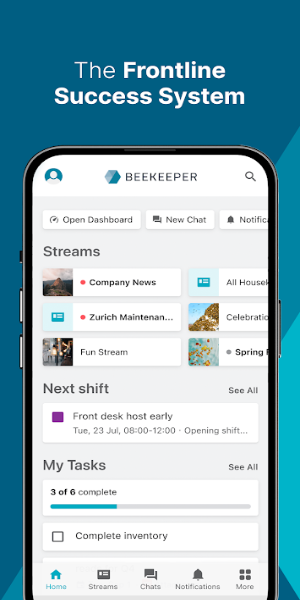
Beekeeper - Frontline Success is a comprehensive frontline management app designed to help businesses streamline operations and boost employee engagement. It provides a centralized hub where users can access shift schedules, pay stubs, onboarding materials, and more. Through real-time communication, file sharing, and task automation features, Beekeeper enhances team productivity and connectivity.
Beekeeper - Frontline Success: Transforming Frontline Business Operations
In the modern fast-paced business landscape, companies continuously look for solutions to improve efficiency, simplify workflows, and increase employee engagement. Beekeeper, the all-in-one Frontline Success System, leads this transformation by revolutionizing how frontline businesses operate. By replacing outdated paper-based processes and manual systems, Beekeeper delivers a mobile-first platform that empowers employees and accelerates business success.
Empowering Your Workforce
Beekeeper is more than a simple communication app—it’s a complete platform that centralizes everything frontline employees need to thrive in their positions. Imagine a single mobile application that brings together shift schedules, pay details, onboarding information, training materials, assigned tasks, safety checklists, and critical announcements. Beekeeper gives employees direct access to these resources, allowing them to do their best work without juggling multiple tools.
Real-Time Communication and Collaboration
Clear communication is essential to any successful business. Beekeeper strengthens real-time communication and collaboration with features built for fast-moving, on-the-go environments. Use chats, activity streams, surveys, polls, and campaigns to connect instantly with frontline staff. The app’s inline translation also ensures smooth cross-team interaction, removing language barriers. Whether sharing urgent updates or collecting employee feedback, Beekeeper keeps communication flowing across the entire organization.
Boosting Frontline Productivity
Eliminate slow paper forms and repetitive manual tasks. Beekeeper modernizes daily work by digitizing checklists, forms, and assignments. This digital approach minimizes errors and saves significant time. Automating essential processes increases productivity and refines workflows so your team can focus on priority tasks. Beekeeper gives employees the tools they need to work efficiently and effectively.
Seamless File Sharing
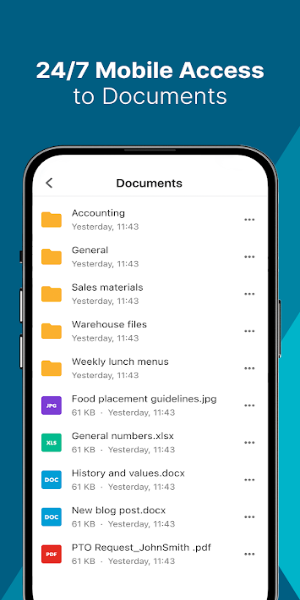
Sharing documents, photos, and videos with coworkers is effortless with Beekeeper. Its file-sharing features ensure that key information is always available. Whether you’re sharing a project status or collaborating on a new plan, Beekeeper keeps everyone connected and up to date.
Efficient Shift Management
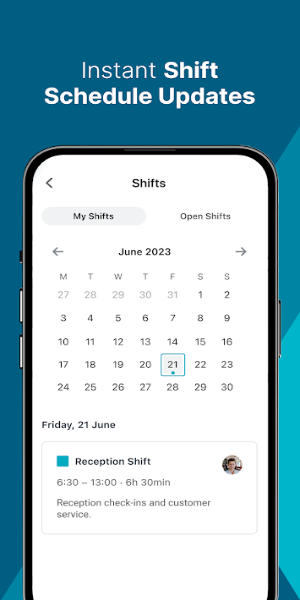
Managing employee shifts can be complex, especially for frontline teams. Beekeeper simplifies this with mobile-first shift alerts, offering flexibility and accommodating scheduling preferences. Using intuitive shift management tools, your team can handle changes seamlessly, ensuring smooth shift coverage and uninterrupted operations.
Streamlining Employee Services
Beekeeper integrates with your current HRIS platforms to create a single, unified experience for employees. They can view shifts, pay slips, and training content right from the app on their phones. Tasks that once took days—such as PTO requests, onboarding, and offboarding—are completed in minutes. With integrations for Workday, ADP, Microsoft Azure, and SAP, Beekeeper enhances your systems and simplifies employee services.
Data-Driven Insights
No more buried data in spreadsheets or paper forms. Beekeeper captures key operational data, offering managers actionable insights for smarter decisions. Using real-time, data-driven intelligence, you can improve the employee experience and drive operational enhancements.
Enhancing Employee Engagement
Engaged employees are more productive and tend to stay longer. Beekeeper helps boost engagement through straightforward surveys that capture essential feedback. Apply this feedback to implement meaningful changes and build a positive workplace. By involving staff in decision-making, Beekeeper reduces turnover and increases satisfaction.
Fast-Tracking Digital Transformation
Starting a digital transformation journey can be challenging, but Beekeeper makes it smooth. Save time and cut IT expenses with ready-to-use integrations and personalized configuration support. For advanced customization, the platform also provides an open API and developer tools for building specialized workflows and custom integrations.
Enterprise-Level Security and Compliance
Keeping sensitive data secure and compliant is critical. Beekeeper protects your information using advanced encryption while maintaining top-tier privacy and security standards. You can rely on Beekeeper to keep data safe while you concentrate on business growth.
Crafted with Care
Designed with passion in Switzerland, Beekeeper blends innovation with a strong awareness of frontline needs. The platform is tailored to address the specific challenges of frontline businesses, delivering a full-featured solution that improves communication, raises productivity, and encourages engagement.
Download Today and Transform Your Experience!
Beekeeper - Frontline Success goes beyond a standard app—it’s a powerful tool that empowers frontline teams, optimizes processes, and accelerates business results. By putting essential tools in one platform, Beekeeper enables businesses to operate more efficiently, increase employee satisfaction, and achieve key objectives. Discover the future of frontline business management with Beekeeper and witness the positive impact it brings to your organization.
How to Install
Download the APK
-Get the APK file from a trusted source, such as 40407.com, to ensure security.
Enable Unknown Sources
-Go to Settings > Security or Privacy.
-Find and enable "Unknown Sources" or "Install Unknown Apps" to allow installation from non-official sources.
Install the APK
-Locate the downloaded APK file in your Downloads folder or file manager.
-Tap the file and confirm installation by selecting Install.
Launch the Application
-Once installed, tap Open from the installation screen or find the app icon in your app drawer or home screen.
-Follow the setup instructions to start using the app.