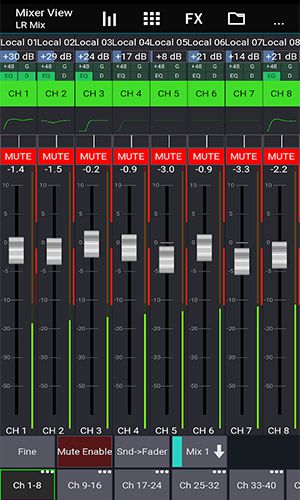
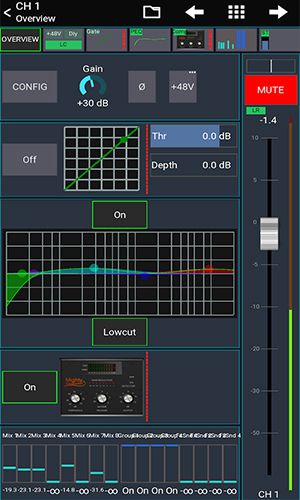
Discover Mixing Station: Fully customizable user interface, Create limitless DCA groups (IDCAs). Tailor layers, layouts, channel order, and multi-group labels to your workflow. RTA overlay within PEQ and GEQ views. Link channels and use relative ganging. View gain reduction history for gate and dynamics processors. Peak hold on all meters with adjustable hold times. Preview PEQ adjustments directly in the channel strip. High contrast mode optimized for outdoor visibility. Popgroups for instant channel access. Comprehensive Routing Matrix. Support for up to 32 channels per layer. Copy mixes with ease. Built-in feedback detection for ringing out monitor wedges. Access to more advanced features varies by connected mixer model. In summary, a professional tool for any mixing environment.
Mixing Station is a powerful app that simplifies audio mixing with an intuitive array of tools. Beyond the core features, it offers added versatility for live engineers, studio producers, and musicians alike.
About Mixing Station
Fully customizable UI
Craft your ideal workspace by customizing layouts, layers, and channel order. This puts the most-used controls at your fingertips for faster, more efficient mixing.
Create unlimited DCA groups (IDCAs)
Establish as many DCA groups as you need for simultaneous control over multiple channels—ideal for making quick level adjustments during live performances.
Customizable layers, layouts, channel order and multi-group labels
Organize your session precisely with fully customizable layers, layouts, channel order, and descriptive multi-group labels, minimizing errors and streamlining your workflow.
RTA overlay in PEQ /GEQ view
See a real-time analyzer (RTA) overlay directly in your PEQ or GEQ view, helping you quickly spot and correct problematic frequencies.
Channel linking and relative ganging
Link channels together or set up relative-ganging groups to adjust multiple channels in unison, maintaining consistent levels and parameters.
Gain reduction history for gate and dynamics
Monitor the history of gain reduction applied by your gate and dynamics processors, making it simple to fine-tune settings for the perfect result.
Peak hold for all meters, editable hold times
Every meter features a peak hold function with adjustable hold times, so you can reliably track levels and prevent clipping or distortion.
Peq preview in channel strip
Audition parametric EQ (PEQ) changes with a preview right in the channel strip before applying them, ensuring you achieve the exact sound you want.
High contrast mode for outdoor usage
Switch to high contrast mode for clear screen visibility in bright outdoor conditions, reducing eye strain and improving usability.
Popgroups
Use Popgroups to assign channels to groups that can be instantly unmuted with one tap—perfect for fast changes in live sound situations.
Routing Matrix
Configure intricate signal paths effortlessly with the built-in Routing Matrix, managing connections between channels and buses with precision.
Up to 32 channels per layer
Work with up to 32 channels on a single layer, providing ample capacity for a wide variety of mixing projects and venues.
Mix copy
Quickly set up new mixes by copying settings from an existing one, saving time and ensuring consistent configuration.
Feedback detection for ringing out wedges
Utilize the feedback detection tool to efficiently ring out monitor wedges, reducing feedback and achieving a clear, balanced monitor mix.
More features available depending on the connected mixer model
Unlock extended functionality based on your specific mixer model, giving you even greater flexibility and control over your mix.
Conclusion
Mixing Station is a robust and flexible mixing application packed with features to make your workflow more efficient and intuitive. From its fully customizable interface and advanced grouping options to real-time analysis tools and processor histories, it delivers professional-grade control for any mixing scenario.