Moose Creek BBQ is an application designed to simplify food ordering. Users can explore the complete menu, place takeout orders, and schedule pickups effortlessly. The app also accommodates special requests, supports easy tipping, and facilitates secure payments via Android Pay. Enjoy a smooth, start-to-finish BBQ experience with just a few taps.
Introducing Moose Creek BBQ: Your Complete Food Ordering Partner
For barbecue lovers who value convenience, the Moose Creek BBQ app provides the perfect on-the-go ordering solution. Built to streamline your dining experience, this user-friendly platform makes ordering your favorite BBQ dishes simpler than ever. This overview highlights the app's core features and advantages, showing how it improves your ordering routine and makes mealtime easier.
Why Use the Moose Creek BBQ App?
In today's fast-moving world where convenience matters, the Moose Creek BBQ app is a standout tool for BBQ fans. Whether you're in the mood for smoky brisket, tender ribs, or a flavorful pulled pork sandwich, the app delivers your preferred meals without the wait or complicated ordering steps. Discover how this app changes the way you order food and why it’s essential for any barbecue enthusiast.
Simplified Ordering Process
Easy Navigation
The Moose Creek BBQ app features an intuitive, user-friendly interface. When you open the app, a clear menu lets you swiftly browse all BBQ choices. The clean layout ensures even new users can locate their favorite items quickly.
Complete Menu Access
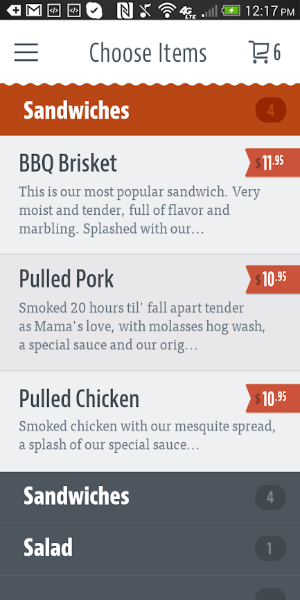
Gain full access to the entire Moose Creek BBQ menu. Scroll through a variety of tempting options, from starters and entrees to sides and desserts. Each dish includes detailed descriptions and prices to help you decide.
Fast and Straightforward Ordering
After choosing your items, placing an order is simple. Add dishes to your cart, review your picks, and proceed to checkout. The app’s efficient flow reduces ordering time so you can return to your day promptly.
Order-Ahead Option
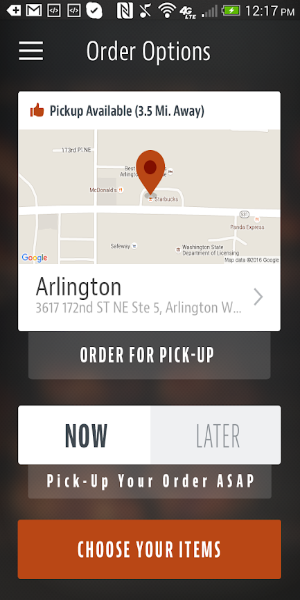
Skip long waits with the order-ahead function. Schedule your pickup time in advance and collect your food when you arrive. This feature is ideal for busy people who want a tasty meal without delay.
Personalized and Handy Features
Special Requests
Add special instructions to your order so your meal is prepared just the way you like. Whether you want extra sauce or a particular side, note your preferences and the kitchen will follow them.
Easy Tipping
Show gratitude for excellent service using the built-in tipping feature. Include a tip during checkout directly in the app—no cash or cards needed—making it simple to thank the staff.
Account & Payment Details
Save time at checkout by storing your account and payment information in the app. With support for Android Pay, transactions are secure and speedy. This feature lets you complete purchases in just a few taps.
Order History & Favorites
The app records your previous orders, making reorders easy. You can also save specific items as favorites for instant access next time. This personal touch improves your ordering experience and simplifies meal decisions.
Outstanding User Experience with the Moose Creek BBQ App
Convenience
The app’s main advantage is convenience. Ordering from Moose Creek BBQ is quick and straightforward, letting you enjoy barbecue favorites without waiting in line or facing a complex process. With order-ahead and saved payment info, the app smoothens every step of food ordering.
Efficiency
Features like special instructions and integrated tipping ensure your orders match your preferences and let you easily acknowledge great service. The efficient checkout process reduces ordering time so you can focus on enjoying your food.
Improved Customer Experience
The Moose Creek BBQ app elevates the overall customer journey by offering a seamless, personalized ordering system. Access to the full menu, scheduled orders, and saved favorites guarantees a satisfying dining experience every time.
Time-Saving
The order-ahead option and quick checkout save valuable time, helping you fit a delicious BBQ meal into a hectic day. Whether grabbing lunch on a break or dinner on the way home, the app ensures your food is ready when you are.
How to Begin with the Moose Creek BBQ App
To start benefiting from the Moose Creek BBQ app, follow these steps:
*Create an Account: Launch the app and register with your email. This saves your orders and unlocks personalized features.
*Browse the Menu: Check out the wide selection and pick your BBQ favorites. Use the app’s tools to customize your order and add any special notes.
*Place Your Order: Review your choices, select a pickup time if using order-ahead, and go to checkout. Use saved payment details or Android Pay for a fast, secure transaction.
*Enjoy Your Meal: Collect your order at the chosen time and savor delicious Moose Creek BBQ. Repeat whenever you crave great food!
Conclusion:
The Moose Creek BBQ app transforms how you order barbecue, delivering a convenient, efficient, and tailored experience. With features built to streamline ordering and improve customer satisfaction, the app lets you enjoy top BBQ dishes with minimal effort. Download the Moose Creek BBQ app today and discover the simplicity of ordering your favorite food on-the-go. Download. Order. Eat. Repeat.