Gamers seeking an edge in MLB The Show 25 can leverage Ambush Hitting, a new feature enhancing batting performance. This guide explains how to utilize this strategic tool effectively.
What Is Ambush Hitting in MLB The Show 25?
Ambush Hitting is a dynamic feature integrated into every at-bat in MLB The Show 25. It allows hitters to predict the pitch location—left or right side of the plate. A correct prediction expands the Plate Coverage Indicator (PCI), widening the timing window for a successful hit. This advantage is particularly beneficial against pitchers who consistently favor one side of the plate. However, indiscriminate use can be detrimental.
How To Use Ambush Hitting in MLB The Show 25
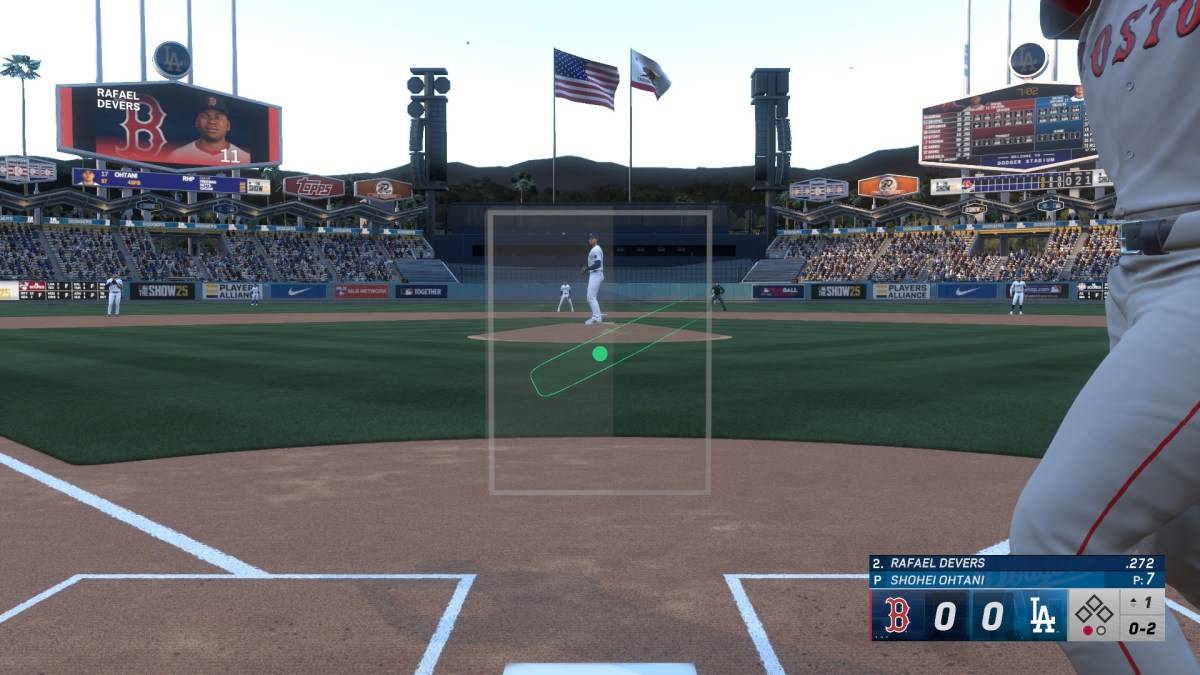
During an at-bat, Ambush Hitting controls appear at the screen's bottom. Use the right stick: left for pitches on the left side of the plate, right for pitches on the right. Your chosen side will highlight in gray, visually representing your expanded PCI coverage. Even if a pitch falls outside this predicted zone, you can still swing or take it; the bonus simply won't apply.
While tempting to use Ambush Hitting on every pitch, remember that MLB The Show 25 pitchers are unpredictable. Observing pitching patterns is key. Identifying predictable sequences allows for strategic Ambush Hitting, maximizing its effectiveness. While not a guaranteed win, it provides a significant advantage that can turn the tide of a game.
This concludes our guide on Ambush Hitting in MLB The Show 25. For further tips, check out our guide on whether to choose college or pro in Road to the Show.
MLB The Show 25 is available now in Early Access on PlayStation 5 and Xbox Series X|S.