In *Assassin’s Creed Shadows*, customizing your Hideout becomes an exciting part of your journey after unlocking it. One of the most delightful ways to personalize your space is by adding a variety of animals, turning your Hideout into a lively sanctuary. Here’s a detailed guide on how to unlock and add these companions to your Hideout.
How to Unlock Animals in Assassin’s Creed Shadows
Unlocking animals for your Hideout is a rewarding process. Whenever Naoe or Yasuke encounters and pets a new breed of cat or dog, that specific animal becomes available for your Hideout. This feature encourages exploration and interaction with the game’s world, as you'll meet various dogs, puppies, cats, and kittens. Notably, the stray dog from the pre-order DLC quest "Thrown to the Dogs" can also join your collection.
Yasuke has another unique way to unlock animals: by painting them. You can capture the likeness of rabbits, fox kits, tanukis, and monkeys in the wild. Once documented, these creatures can be brought back to the Hideout, adding a touch of wilderness to your space.
For those interested in farm life, vendors across Japan offer farm animals like oxen and goats for purchase with in-game currency, mon. This provides an opportunity to diversify your Hideout with different species.
How to Add Animals to the Hideout in Assassin’s Creed Shadows
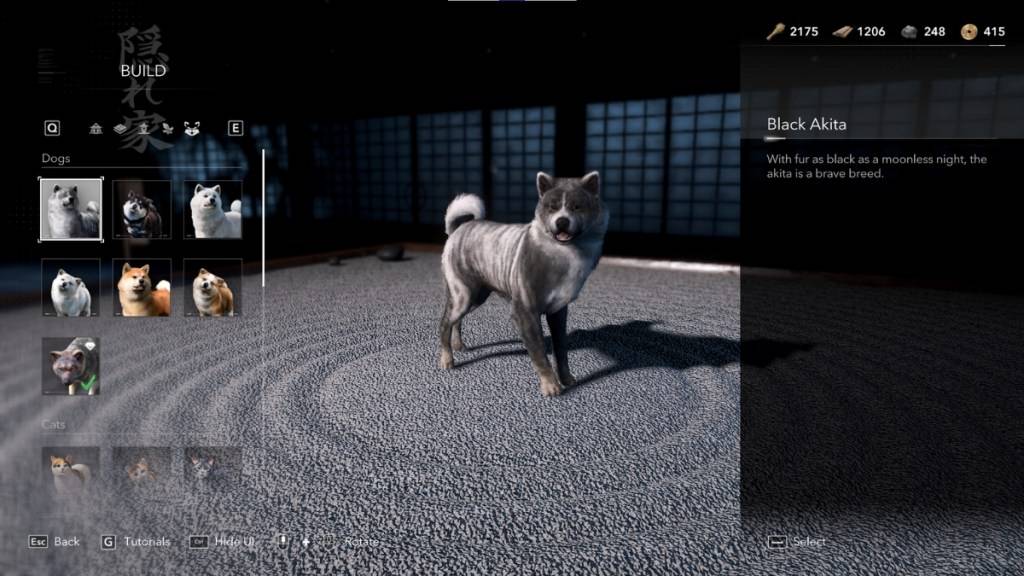
Choose the animal you wish to add. You'll be taken to an overhead view of your Hideout, where you can select an open grid and place your new companion. Remember, animals will roam freely once you exit build mode, so they might not stay in the exact spot where you placed them.
You have the flexibility to add multiple instances of the same animal, except for the "Thrown to the Dogs" pup. However, there is a cap on the total number of animals you can have in the Hideout. You can always remove or replace animals by erasing them in build mode and adding new ones to keep your sanctuary fresh and engaging.
That’s the complete guide on how to add animals to the Hideout in *Assassin’s Creed Shadows*. Enjoy the companionship and vibrant life these animals bring to your space!
*Assassin’s Creed Shadows* is now available on PC, PlayStation 5, and Xbox Series X|S.