Photoshop Express is a flexible and intuitive photo editing application from Adobe. It puts a comprehensive suite of tools and features at your disposal, enabling you to effortlessly enhance, personalize, and elevate your photos into impressive visuals. Suitable for both photography veterans and editing newcomers, Photoshop Express delivers a smooth and satisfying editing workflow, establishing itself as an essential app for all your image improvement projects.
Premier Photo Editor
Photoshop Express is Adobe's high-quality photo editor, built for straightforward and enjoyable image editing. This accessible app provides numerous tools to improve your photos quickly. You can retouch portraits, use filters, and personalize images with overlays, stickers, and other elements. It also assists in fixing flaws, applying stylish effects, and designing collages and memes for social sharing.
Its standout quality is simplicity, making it a great fit for novices and professionals alike. It enables you to produce edits of a professional caliber without needing expert knowledge. Whether you're starting out with photo editing or are a seasoned photographer, Photoshop Express is a robust yet uncomplicated tool for revitalizing your images.
Comprehensive Photo Editing Toolkit
The editing tools in Photoshop Express are your path to effortlessly creating photos worth sharing. As a versatile image editor, it offers a full spectrum of features to refine your pictures. From radial blur effects that draw focus to specific subjects to a broad selection of preset filters like matte, HDR, and vintage, you have everything required to achieve the ideal look. Moreover, you can quickly crop images, straighten skewed shots, and fix distorted perspectives with just a few taps. The auto-resize tool smoothly adapts your photos for various dimensions and orientations. The editor also lets you add custom details to your images, serving as a complete solution for all your editing tasks.
Photo Enhancer & Retouching Tool
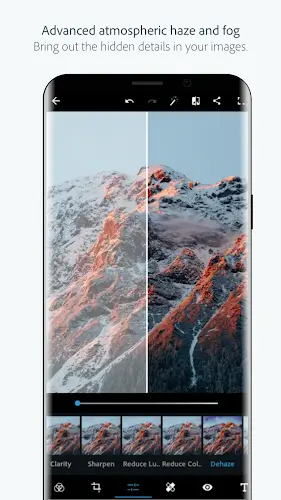
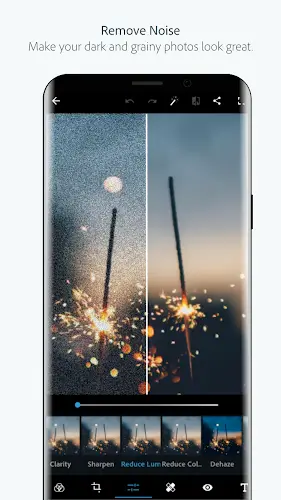
The photo enhancer and retouching tools in Photoshop Express are crafted to maximize the potential of every image you edit. These refined design tools allow you to improve your photos' appearance in multiple ways. You can achieve smoother-looking skin using the blemish remover and spot healing features. With a simple tap, you can retouch photos, clean up backgrounds, and delete unwanted elements. Correcting imperfections, reducing haze, and applying lively or bold filters is effortless. Additionally, Photoshop Express includes AI-powered tools that can erase objects, apply virtual makeup, and restyle images to match your vision. It also effectively reduces blur and minimizes background noise, giving your photos a clean, professional finish.
Top-Tier Photo Collage Maker
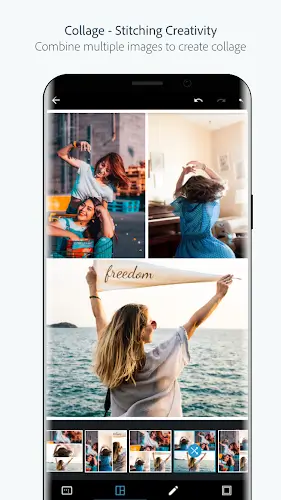
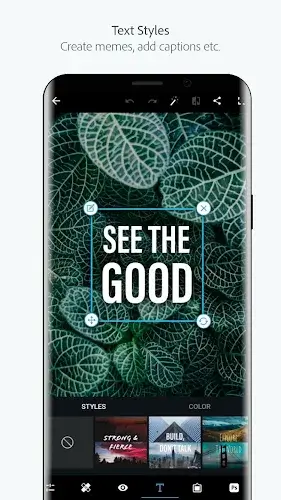
For creating engaging photo collages, Photoshop Express sets the standard with its user-friendly and capable collage maker. Building collages is a simple and fun process, thanks to a selection of pre-designed grid layouts. You can easily layer images, use masks, add stickers, and unleash your creativity by re-envisioning your surroundings. The app also provides straightforward graphic design options for making memes and adding stamps, custom watermarks, and text with diverse fonts and layouts. Whether you're assembling a professional montage or just experimenting with your photos, Photoshop Express offers a first-class solution.
Simple Photo Upload & Sharing
Uploading and sharing your photos is remarkably easy with Photoshop Express. The app supports various source formats, including RAW and TIFF, letting you work with a wide array of image files. It's not only a powerful editor but also an ideal choice for social media and Instagram users. You can seamlessly post your edited photos to your preferred platforms like Pinterest, Snapchat, Facebook, TikTok, WhatsApp, Telegram, Signal, and Line, inspiring others with your creative output. With Photoshop Express, your photos aren't just enhanced—they're effortlessly shared and enjoyed by a broader audience.
Summary
Photoshop Express lets you easily edit and enhance your cherished memories, making it a complete and user-friendly tool for transforming your photos. Whether you're a beginner or a pro, it delivers powerful editing capabilities for all users. In this article, we provide the MOD APK file version of the app with an exclusive feature: Premium/Paid features unlocked for free. Readers can download it via the link below!