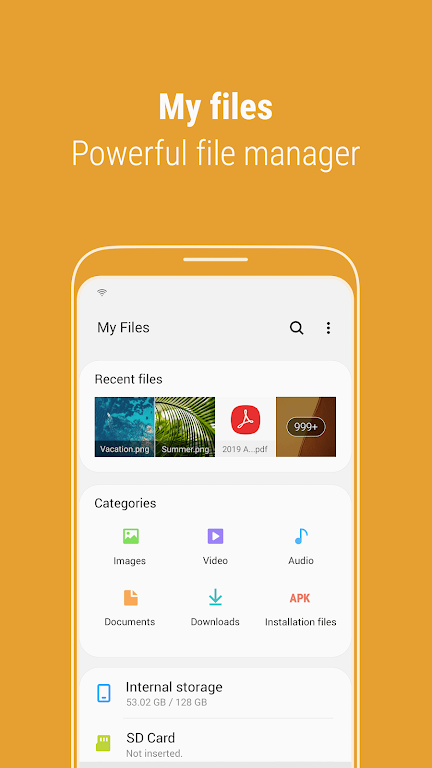
Meet Samsung My Files, the go-to file management app for your smartphone. Think of it as the file explorer on your computer – it allows you to browse and organize all the files on your device with ease. But that's not all: you can also handle files saved on SD cards, USB drives, and even cloud storage linked to your device. Just a few taps let you free up valuable space and hide any storage areas you don’t use. You'll appreciate our intuitive tools like the Recent Files list, Categories list, and shortcuts for folders and files. Enjoy seamless control over your files today with Samsung My Files.
Key Features of Samsung My Files:
Storage Analysis: Use the "Storage Analysis" button on the main screen to quickly free up space with a single tap.
Customizable Home Screen: Personalize your My Files home by hiding any unused storage areas from the main display.
Improved File Viewing: Switch to "Listview" to see full file names without truncation or ellipses.
File Management: Easily browse and manage files on your smartphone, SD card, or USB drive. Create folders, move, copy, share, compress, decompress files, and check file details.
User-Friendly Tools: Locate downloaded, opened, or recently used files using the Recent Files list. Sort files by type – documents, images, audio, video, and .APK installation files. Add shortcuts for folders or files to your device home screen or My Files main screen for instant access.
Storage Optimization: The app offers storage analysis and cleanup tools to help you free up space and keep room for what matters.
Final Thoughts:
Samsung My Files brings all your files together in one easy-to-manage hub. With storage analysis, customizable home screens, and improved viewing options, organizing and finding files is simpler than ever. Use features like the Recent Files list and smart file categories for quick access. Download the app today and enjoy effortless file management, including tools to analyze and clear storage so you always have space for important files.