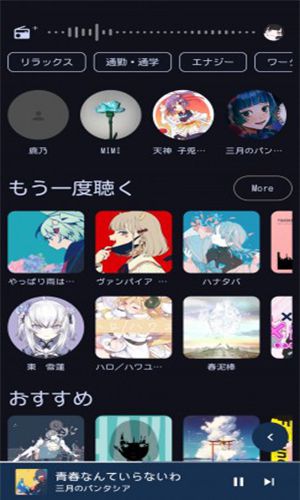
Are you tired of language barriers and searching for a music experience tailored to your preferences? Look no further! SpMp – YouTube Music Client delivers a uniquely personalized music streaming experience. SpMp, short for “Specialized Music Player,” is more than just another app; it's a cutting-edge Android application built with Kotlin and Jetpack Compose. What makes SpMp stand out is its focus on language and metadata customization, putting you in full control of your music journey.
Customizable Metadata
You can edit song, artist, and playlist titles to create a personalized music library. The app also separates UI and metadata languages, allowing you to display the interface in one language while showing songs and artists in another—for example, English UI with Japanese song titles.
YouTube Music Integration
SpMp integrates seamlessly with YouTube Music, featuring an in-app login for personalized feeds and interaction. This ensures a tailored and engaging music discovery experience.
Lyrics Integration
SpMp fetches and displays lyrics from PetitLyrics, with ongoing work to support timed lyrics. Timed lyrics appear above the home feed, enriching your listening. For Japanese kanji, SpMp uses Kuromoji to show furigana within lyrics, aiding comprehension.
Song Queue Enhancements
Managing your song queue is easier than ever. SpMp adds an “Undo” button for queue actions, preventing accidental removals. Radio filters, when available from YouTube, improve the radio experience. A “Play after” option in the song's long-press menu lets you choose a queue position for insertion, with automatic position adjustment for smooth management.
Multi-Select Functionality
SpMp introduces a versatile multi-select mode, activated by long-pressing any media item (song, artist, or playlist). In this mode, you can select multiple items for batch actions like downloading or playlist management. Screen-specific actions, such as removing from a playlist or editing the queue, are also available.
YouTube Feature Parity
SpMp aims for feature parity with YouTube, offering a home feed with filters, song radio with filter options, and a custom radio builder. You can like/dislike songs, subscribe/unsubscribe from artists, and access artist and playlist pages (work in progress). A persistent music queue ensures uninterrupted listening.
Home Feed Customization
You can pin any song, playlist, album, or artist to the top of your home feed, customizing your music discovery. Specific recommendation rows can be disabled, and the feed highlights your most-listened artists. When offline, the library page replaces the feed for easy access to your collection.
Connectivity and Discord Integration
SpMp offers customizable Discord Rich Presence with image support via KizzyRPC, including in-app login. You can edit text, toggle an “open on YouTube” button, and visit projects directly from the app.
Theming and UI Customization
SpMp features an intuitive UI theme editor, allowing you to create and customize multiple named themes. The app can automatically extract an accent color from the current song's thumbnail. Three theming modes are available for the player menu, and you can choose from three accent color sources for extensive customization.
Playlist Management
Create playlists locally and optionally convert them to YouTube playlists on your account. You can rename playlists, add, remove, and reorder songs, and set custom playlist images—currently selectable from an added song. Add songs to playlists from any screen using the long-press menu or multi-select.
Accessibility Enhancement
To improve accessibility, SpMp provides a service for fine volume control, even with the screen off, on rooted devices.
Conclusion
In summary, SpMp is a feature-rich YouTube Music Client that meets your needs for customization, functionality, and personalization with an elegant, user-friendly interface. You can download its MOD APK version from this article. Thanks for reading, and enjoy!