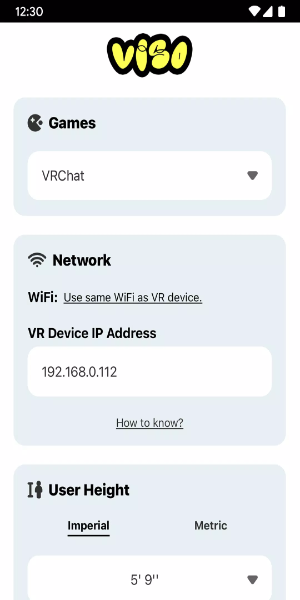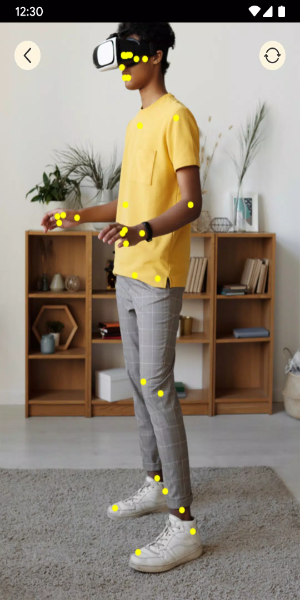
Get ready for an unmatched full-body tracking experience with Viso FBT! Say goodbye to bulky physical trackers – now, dive completely into VR using just your smartphone camera. Best of all, this innovative solution is completely free and exceptionally user-friendly, opening up the possibilities for all VR fans. Discover the future of VR interaction with Viso FBT today!
Design and User Experience:
**Intuitive Design**
Viso FBT is built around a user-focused design that simplifies full-body tracking setup and operation in virtual reality. The app cleverly uses your smartphone camera as a motion sensor, removing the requirement for extra hardware. Its interface is clear and walks you through calibration effortlessly, guaranteeing a smooth setup.
**Seamless Integration**
Viso FBT integrates smoothly with major VR platforms like VRChat on both Quest and SteamVR. It taps into your smartphone camera's power to capture and translate your body's subtle movements into the virtual space. This ensures broad compatibility with different VR systems, offering users flexibility and convenience.
**Real-Time Motion Capture**
Enjoy real-time motion capture taken to the next level with Viso FBT. The app precisely tracks movements from your elbows down to your feet, enabling accurate avatar animations in VR. Whether you're dancing, gesturing, or moving around, Viso FBT faithfully replicates your actions in the virtual world, boosting immersion and interaction.
**User-Friendly Interface**
Navigating Viso FBT is straightforward and intuitive. The interface is designed for easy access, featuring clear instructions for calibration and setup. You can effortlessly tweak settings and preferences to fine-tune your VR experience, ensuring full-body tracking fits seamlessly into your virtual adventures.
**Enhanced Immersion**
Viso FBT deepens your immersion in virtual reality by enabling natural interaction within the digital environment. By using your smartphone camera for motion tracking, the app closes the gap between the physical and virtual worlds, delivering a captivating and accessible VR experience for all users, no matter their setup or experience level.
Powerful Functions of Viso FBT:
**Precise Motion Tracking**
Viso FBT excels at delivering precise motion tracking using only your smartphone's camera. It captures movements from your elbows to your feet, turning them into accurate avatar animations in VR environments like VRChat on Quest and SteamVR. This allows for a smooth, responsive VR experience without the need for extra physical trackers.
**Real-Time Avatar Animations**
Experience real-time avatar animations that perfectly reflect your body's movements with Viso FBT. The app captures and translates your gestures, poses, and locomotion into the virtual world, deepening immersion and interaction. Whether you're dancing, walking, or handling objects, Viso FBT keeps your avatar movements synchronized and natural for a more lifelike, engaging VR session.
**User-Friendly Setup**
Viso FBT features a user-friendly setup process that makes configuring full-body tracking in VR simple. You can easily calibrate your smartphone camera for the best motion capture accuracy. The app offers clear instructions and guidance, so even VR newcomers can get Viso FBT up and running quickly and efficiently.
**Multi-Platform Compatibility**
Enjoy flexibility with Viso FBT's multi-platform support. The app works with popular VR platforms like VRChat on both Quest and SteamVR, serving a wide spectrum of VR enthusiasts. Whether you use a standalone headset or a PC setup, Viso FBT integrates seamlessly, letting you enjoy full-body tracking across various VR environments.
**Free and Accessible**
Viso FBT is free to use, making it available to a broad audience of VR users. The app removes the need for costly physical trackers, providing an affordable way to enjoy immersive full-body tracking. With Viso FBT, you can elevate your VR adventures without financial hurdles, ensuring everyone can benefit from advanced motion capture technology.
How to Install:
- Download the APK: Get the APK file from a trusted source, 40407.com.
- Enable Unknown Sources: Go to your device's settings, find the security section, and allow app installations from unknown sources.
- Install the APK: Locate the downloaded APK file and follow the on-screen prompts to install.
- Launch the App: Open the app and start enjoying it.