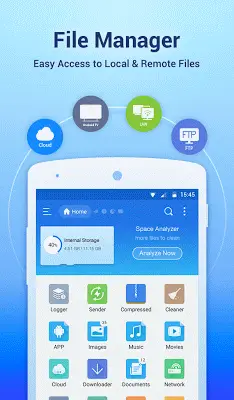
ES File Explorer File Manager stands out as a feature-rich file management application designed specifically for Android devices. With its intuitive interface and powerful capabilities, it delivers a desktop-like experience for organizing and controlling files, applications, and media content. From essential operations like Multiple Select and Cut/Copy/Paste to its integrated Application Manager for streamlined app control, this file manager addresses various user requirements. Its multilingual interface, customizable icons, theme options, and media handling capabilities enhance its overall appeal. Additional features like storage analysis and PC connectivity through FTP contribute to its comprehensive nature. Whether you need basic file organization or advanced system-level access, ES File Explorer File Manager proves to be an essential tool that simplifies daily tasks on Android devices.
Exploring Android file management solutions
When selecting an Android file manager, the ideal choice often depends on personal preferences and specific requirements. While ES File Explorer File Manager offers extensive functionality, several alternatives cater to different user needs. Solid Explorer features a polished dual-pane interface for smooth file transfers. Astro File Manager integrates cloud storage for seamless cross-device file synchronization. FX File Explorer combines Material Design aesthetics with convenient Web Access for efficient file management. Total Commander stands out with its extensive plugin ecosystem for expanded capabilities. Amaze File Manager, as an open-source option, provides customization features and root access support. Your decision should balance advanced functionality, simplicity, and interface preferences. Trying these applications directly will help you identify the file management solution that best fits your workflow and enhances your Android experience.
Application manager
The integrated Application Manager distinguishes ES File Explorer File Manager by enabling users to organize, uninstall, backup, and create shortcuts for their applications. This functionality centralizes app management, offering users a unified control center for their installed applications.
Multilingual support
Supporting more than 20 languages, ES File Explorer File Manager serves a global audience, ensuring accessibility and ease of use for international users. This multilingual approach significantly improves the application's inclusivity and user experience.
Customizable icons and themes
Beyond standard file management, ES File Explorer File Manager empowers users to customize their visual interface. Featuring three commercial icon sets for over 100 file types and multiple themes with stylish icons, users can tailor the application's appearance to match their personal style, adding visual appeal to their file management activities.
Media management
ES File Explorer File Manager's integrated music player, image viewer, and text editor transform it into a versatile multimedia tool. Users can efficiently handle media files within the application, eliminating the need for separate media playback applications for basic functions.
Storage analysis
The application takes a proactive approach to storage management through its built-in storage analysis feature. This tool helps users identify and remove unnecessary files, supporting better storage optimization and improved device performance.
PC access via FTP
ES File Explorer File Manager's FTP support enables seamless file management between Android devices and computers. This feature simplifies file transfers and device synchronization, significantly expanding the application's versatility.
Root explorer for advanced users
For advanced users requiring complete device control, ES File Explorer File Manager includes root explorer functionality. This feature provides access to system files and operations typically unavailable in standard file management applications.
Advanced search and sharing features
The application streamlines file navigation through its comprehensive search functionality while enabling direct file sharing from within the interface. These capabilities improve file accessibility and facilitate collaboration.
Conclusion
ES File Explorer File Manager maintains its position as the preferred file management solution for Android users, delivering comprehensive features that address both fundamental and advanced organizational needs. Through its user-friendly design, extensive functionality, and consistent updates, ES File Explorer File Manager remains the top choice for those seeking an efficient and powerful file management application for their Android devices.