Over the past decade, the concept of cross-platform play has evolved from a distant dream into an everyday reality. While crossplay has unified the *Call of Duty* community, it isn't without its downsides. Here’s a detailed guide on how to disable crossplay in *Black Ops 6*.
Should You Disable Crossplay in Black Ops 6? Answered
Disabling crossplay in *Black Ops 6* is a decision that comes with both advantages and drawbacks. The primary reason players might choose to turn off crossplay is to ensure a more level playing field, where everyone has a similar and fair gaming experience. Console players on Xbox and PlayStation often seek to avoid facing PC players due to the differences in input methods.
If you're playing on a console, you may consider disabling crossplay to avoid competing against PC players who use mouse and keyboard. These input methods provide a significant advantage, as aiming with a mouse offers greater precision compared to a controller. Additionally, PC players might have easier access to mods and cheats. Despite *Call of Duty*'s Ricochet Anti-Cheat system, players in *Black Ops 6* and *Warzone* have reported encountering numerous hackers and cheaters. Disabling crossplay could, in theory, reduce your chances of facing these cheaters in your lobbies.
However, there's a significant drawback to disabling crossplay in *Call of Duty*. It reduces the total pool of available players for matchmaking, which can lead to longer wait times for matches and potentially poorer connections between players. Our experience with crossplay disabled has shown that it often takes longer to find matches, and the lobbies might suffer from connectivity issues.
Related: Full Call of Duty: Black Ops 6 Zombies Walkthrough
How To Turn Off Crossplay in Black Ops 6
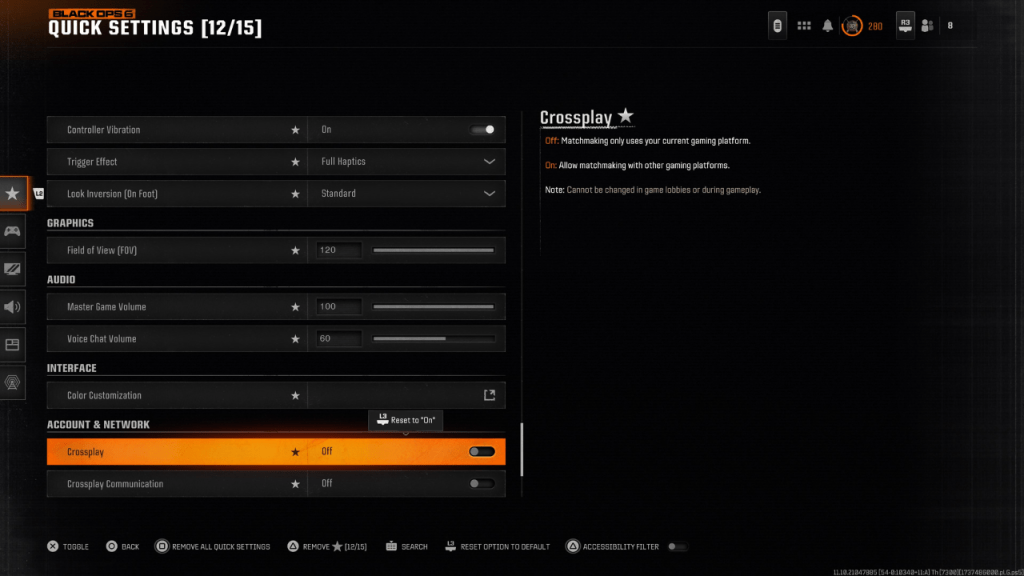 Turning off Crossplay in *Black Ops 6* is a straightforward process. You can find the Crossplay and Crossplay Communications toggle at the top of the Account & Network settings. Simply navigate to these settings and press X or A to switch the setting from On to Off. This adjustment can be made from within *Black Ops 6*, *Warzone*, or the main *Call of Duty* HQ page. Note that in the image above, we accessed the Crossplay setting by adding it to the Quick Settings for easy access.
You might find the setting greyed out and locked at times, particularly in modes like Ranked Play, where *Call of Duty* has previously mandated crossplay. While this was intended to promote fairness, the result often feels quite the opposite. Fortunately, starting with Season 2 of *Black Ops 6*, players will have the option to disable crossplay, giving them more control over their gaming experience in the game’s most competitive modes.
*Call of Duty: Black Ops 6 is available now on PlayStation, Xbox, and PC.*