Rotation: A Dynamic Android Screen Orientation Manager
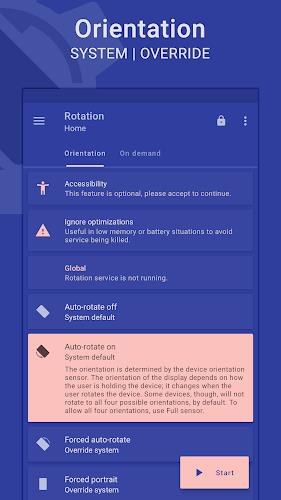
Rotation is a highly customizable Android application offering unparalleled control over screen orientation. Users can effortlessly manage their device's display, selecting from a variety of modes including auto-rotate, portrait, landscape, and reverse orientations. This flexibility extends to event-based orientation changes, triggered by actions such as incoming calls, device locking, headset connection, charging, and docking.
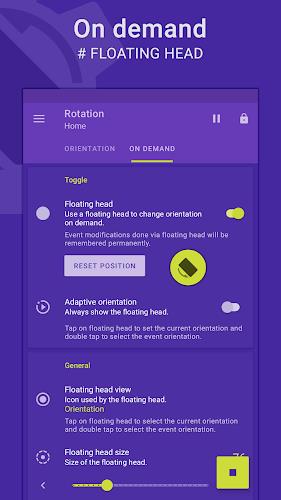
The app's intuitive interface includes a convenient floating head, notification, or tile, providing quick access to orientation adjustments for foreground applications or specific events. A dynamic theme engine ensures optimal visibility and an aesthetically pleasing user experience, complemented by backup and restore capabilities and support for multiple languages.
Key Features:
- Comprehensive Orientation Control: Manage and personalize your Android device's screen orientation to perfectly suit your needs.
- Diverse Orientation Modes: Choose from a wide selection of modes: auto-rotate (on/off), forced portrait/landscape, reverse portrait/landscape, and sensor-based portrait/landscape.
- Event-Driven Orientation: Configure orientation changes based on various events, including calls, headset connection, charging status, docking, and specific app usage.
- Accessible Floating Control: Quickly adjust orientation using a customizable floating head, notification, or tile accessible from any supported task.
- Dynamic Theming: Enjoy a visually appealing interface with a background-aware theme engine guaranteeing optimal visibility.
- Enhanced Functionality: Benefit from additional features such as auto-start on boot, notifications, vibration feedback, widgets, shortcuts, and backup/restore functionality for settings.
In Conclusion:
Rotation provides a seamless and personalized experience for managing screen orientation. Its comprehensive features, user-friendly design, and dynamic theme engine make it the ideal solution for users seeking complete control over their Android device's display. Download Rotation today and take command of your screen orientation.